

Over the last couple of weeks, we nearly doubled the number of ready-to-ship legal documents firms were able to produce each week with LxOS.
In our most recent batch of work, almost every document we observed passed through lawyer review without requiring a subsequent edit. That doesn't eliminate the review process, but adapts it to be more about checking the work rather than repairing it.
Our first customer in Australia came to us with a difficult operational problem. Too much of the team’s week was disappearing into context switching, document preparation, repeated review, and the coordination required to move legal work from one stage to the next.
Over the last two months they have moved the firm’s workflow onto LxOS. What has been most interesting to us is how much more legal work the same operating system can now carry.
Documents sit at the center of a large amount of legal work. But producing a document is not the same as generating a first draft. A finished document has absorbed the firm's context, survived revision, retained the right formatting, and reached a state where a lawyer can actually use it.
A lawyer's task does not end when a model produces an answer. The output still has to be connected to the right matter, applied to the right document, reconciled with the surrounding context, and preserved through review and revision.
The last few months have convinced me that model intelligence is no longer the main bottleneck in legal drafting. The harder problem is everything between a good model response and legal work a lawyer can actually trust.
The rest of this article will explore how we got there.
Templates
This is one of the pieces of legal work most commonly misunderstood by AI legal companies. Law firms care as much about their branding, fonts, formatting, templates, etc. as they do about accurate legal content.
Templates are repetitive documents that firms reuse for several clients. You might see a template document on a firm letterhead that uses placeholders throughout the document.
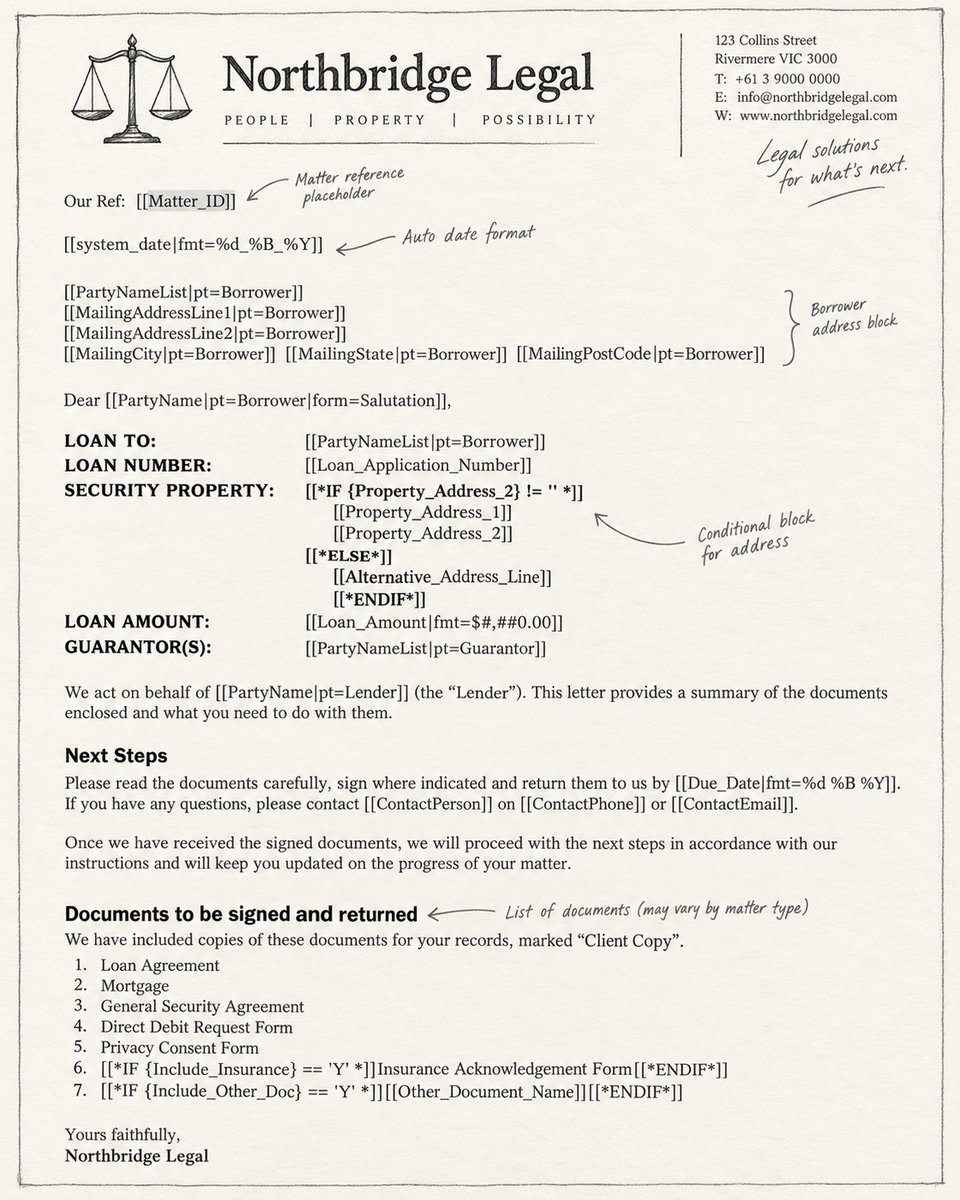
These templates are often generated by archaic software and have no intention of making them usable outside of that environment. So, we spent several iterations to figure out the best way to build templates for an AI model to complete it reliably. The answer is plain English.
Look at Fig. 2 to see what a LxOS Template looks like. The result is simple: clear natural-language placeholders that are easier to maintain and are not tied to a proprietary template syntax. We attempted to build an easy template design and work our way backwards from that.
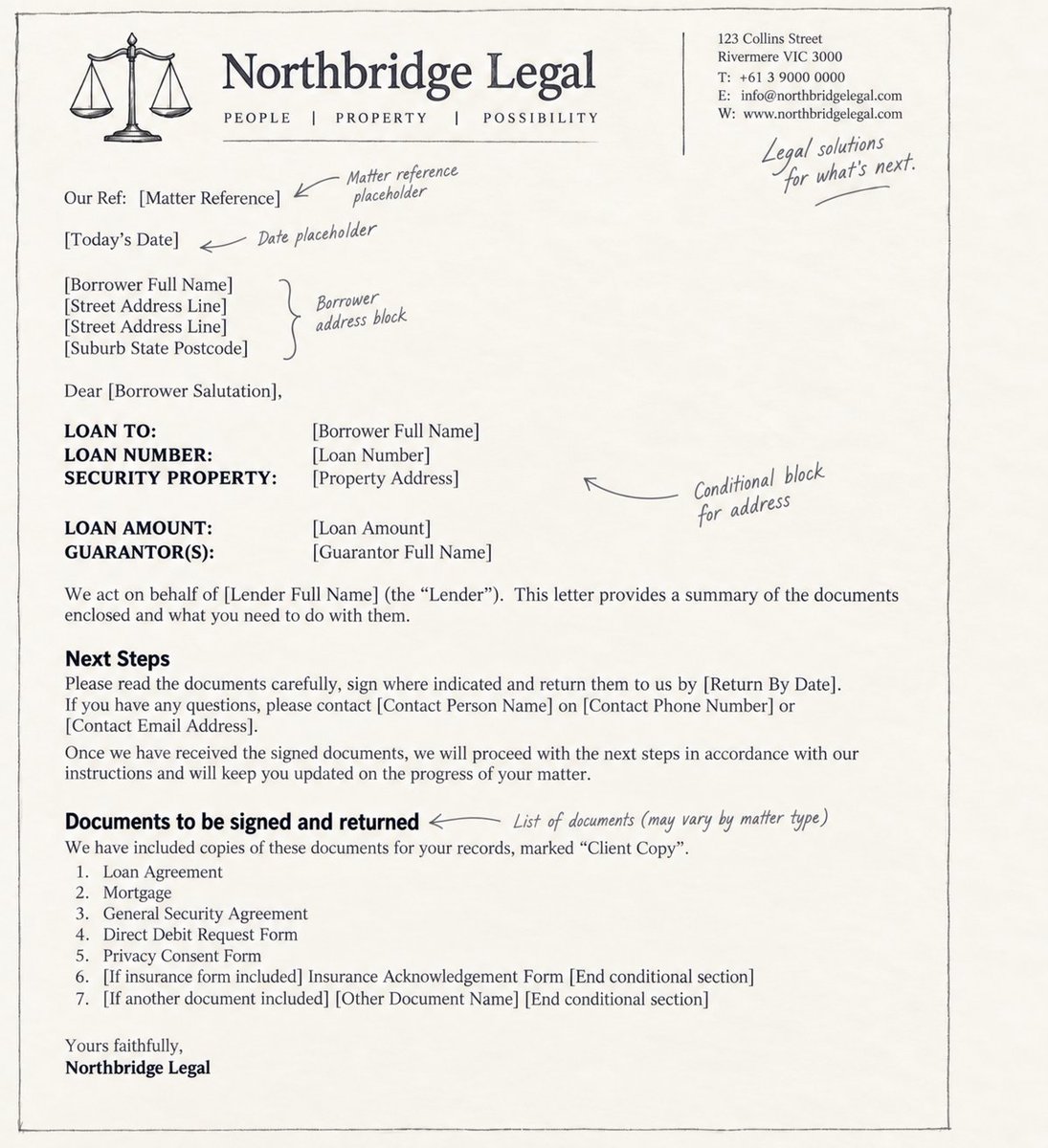
The document is calling out for help
Consider a template that has a placeholder [If wet-ink signatures are required], followed by several paragraphs of signing instructions. Later, another heading introduces a different topic.
The author has expressed a condition in ordinary language, but has not explicitly marked where it should end. And an AI company should not expect the user to provide start and end statements for conditional blocks. So, we need to answer two questions - does the condition apply and what is its scope?
A correct answer to the first question can still produce the wrong document. Removing only the conditional marker can leave irrelevant instructions behind. Removing too much can delete wording that belongs in the document. So before LxOS can act on a condition, it has to establish exactly which paragraphs that condition controls.
We use a model to reason about the likely boundary, but we do not let that reasoning directly determine what gets deleted. The proposed scope is checked against the actual document context and structure before an edit is allowed through.
The point is to allow users to naturally explain what they want without having to deal with too much syntax.
Microsoft Word
This is arguably the most frustrating component of any production document workflow. But, the legal world lives in Word. So, anyone building for lawyers must adapt to their customers.
A field can contain the right information and still leave the lawyer with work to do if its formatting is wrong or the change has not been saved into the file.
Word stores text in formatted pieces within paragraphs. Headers and footers can live in separate parts of the document. Microsoft's explanation of WordprocessingML provides the useful background: the sentence on screen is only one layer of the file's structure.
Applying generated edits precisely to an existing Word document is surprisingly difficult. To address this, we built an internal document interface that lets LxOS make tightly scoped edits while preserving the surrounding Word structure. We use a simple rule internally: filling a document should not create a new formatting job for the lawyer.
This interface is deliberately specialized. We are not trying to build the best general-purpose AI native Word editor. We care about the structures, failure modes and editing patterns that appear repeatedly in legal documents. That narrower objective lets us optimize much more aggressively for the work lawyers actually do.
Recovery
A critical aspect of any document pipeline is being able to recover a previous state reliably. While this requirement is fairly straightforward for manually created documents, it is a slightly more nuanced problem when dealing with AI-document interfaces.
The generation and delivery of edits can fail independently and at different points. The correct recovery depends on knowing exactly which stages have already completed.
LxOS separates preparation, generation, and resolution. When generation has finished and its result has been saved, resolution can still be attempted from that result. The model does not have to write the document again just because a later stage failed.
An interrupted generation with no completion record, however, is a different situation. There may have been work done that wasn't accounted for. Thus, the implementation chooses to retain saved work and report the interruption instead of making assumptions or attempting retries.
This choice does limit automatic recovery, but it avoids treating an unknown outcome as permission to repeat the operation. This discussion explores the general problem of repeating a request without duplicating its effects. Here, the practical decision was to let different stages of the pipeline have different recovery paths.
A real example we encountered last week made this distinction concrete. Drafting was complete, but the document could not be collected. A PostgreSQL lookup returned an object whose fields were empty. The application treated the presence of the object as proof of a saved version, then failed because that supposed version had no file.
The correction was small: require the identity of an actual saved version before treating the lookup as completed work. The regression tests distinguish an empty result from a genuine saved record with a missing file. They are different failures and need different handling. From inside the system, this was a check on a returned value. From the user's side, it was the difference between having a generated draft somewhere in the workflow and being able to retrieve the document.
Completion belongs to the current request
A revision creates a similar problem. There may already be a document available when the lawyer asks for a change. Its presence does not tell us whether the new request succeeded.
We changed the completion check so that earlier deliveries cannot, by themselves, make a new drafting turn appear complete. Previous files can remain available while the current delivery is recorded as incomplete. The added regression test starts with an earlier file, gives the new request no output, and checks that it is not marked complete.
Anthropic makes a useful distinction between an agent's transcript and the resulting state of its environment in Demystifying evals for AI agents. For our workflow, that means checking whether the requested document exists in the right state, rather than relying on a completion message in the conversation.
Even then, availability is not professional approval. A retrieved file still needs the appropriate review. The completion check should be precise about the promise it makes.
Returning to the work week
The near-doubling in weekly document output gives us an outcome worth paying attention to. I cannot tell you what percentage came from better template handling, more reliable Word editing, safer recovery, or other changes we made around the workflow.
What I can see is where the remaining waste lives.
A model producing the right words is only the beginning. The document still has to contain the right facts, preserve the firm's structure, survive revision, recover correctly when something fails, and arrive in a state a lawyer can actually trust.
That is increasingly where we spend our engineering time.
The models will keep getting better. Our job is to make sure those improvements actually reach the working week of a law firm.
Originally published on X.